
—
Pick your city to get the right prayer times
The times above are an example, not for where you are.
We could not find that page
The address may be old or mistyped. Prayer times, Qibla, the Quran and the guides are all one tap away from Home.
How Aasiya Works
Two minutes and you know everything. Free forever, no ad networks, and we never sell your data.
Put Aasiya on your phone
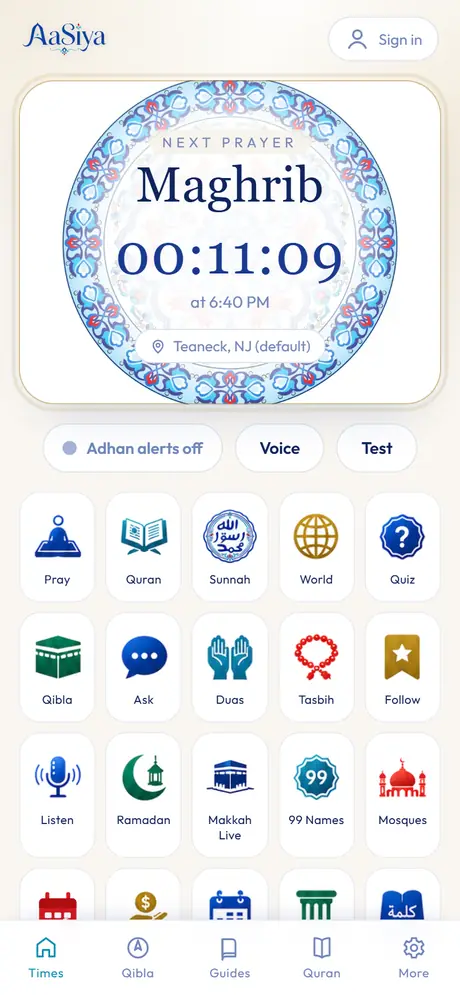
Hear the adhan at every prayer

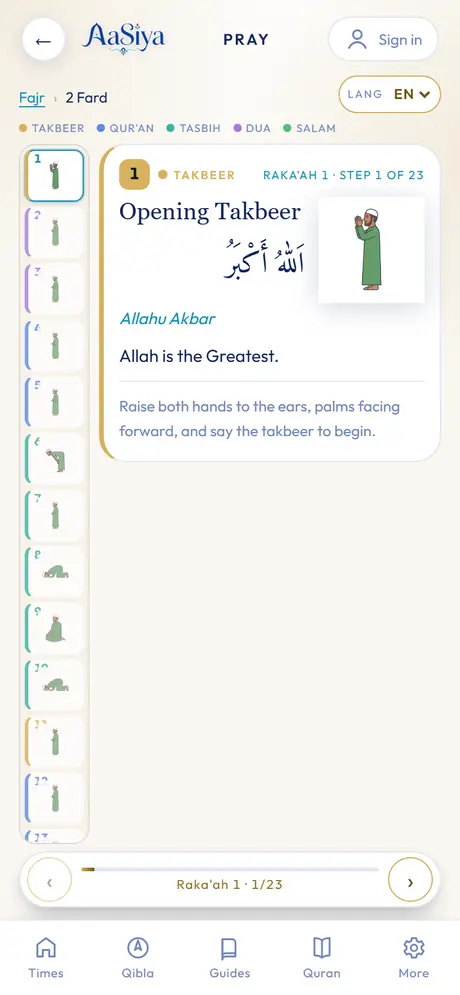
Learn to pray, properly
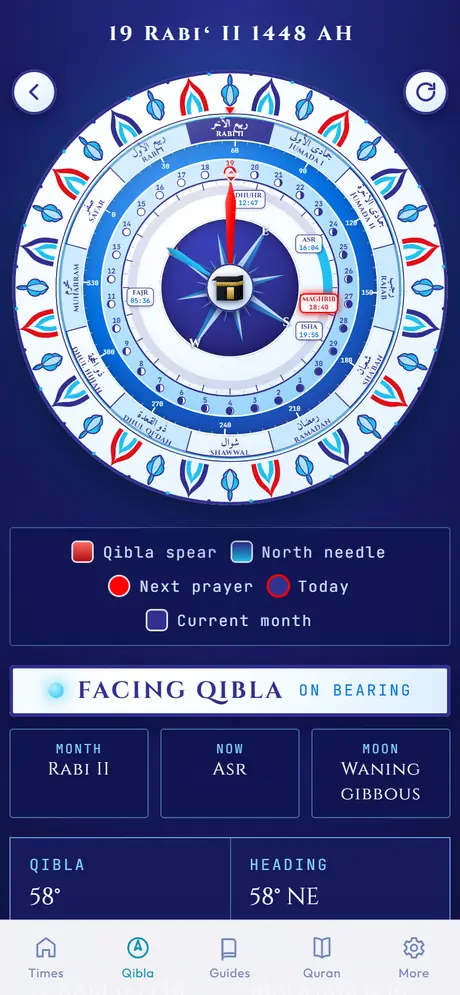
Find the qibla anywhere
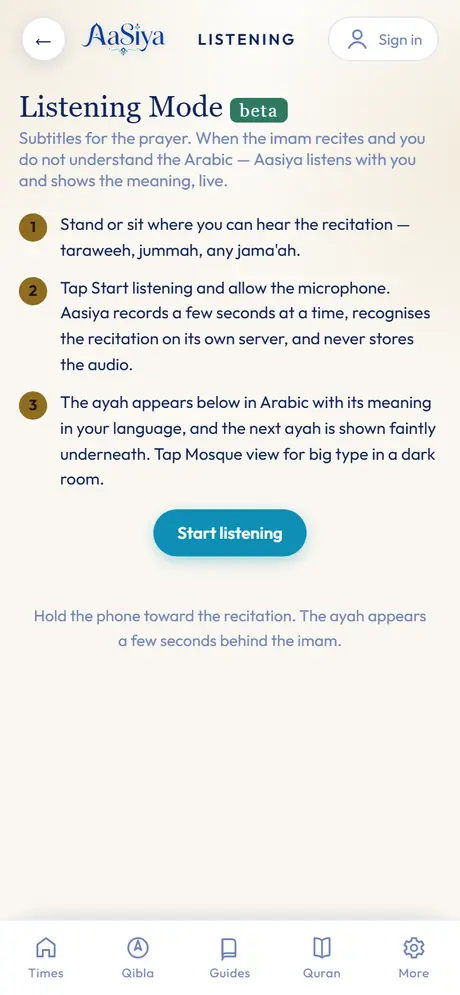
Understand the imam, live
Privacy
Last updated 2026-11-27
Aasiya is free. There are no ad networks and we never sell your data. We do use Cloudflare Web Analytics to count visits (details below). Aasiya may show its own small cards, labelled From the Aasiya team, and counts taps on them as a total only, with nothing about you. Most of Aasiya works without an account, and your prayer times are calculated on your own device. This page explains exactly what we keep, and why.
Analytics
Every page loads Cloudflare Web Analytics, a small script that tells us how many people visit, which pages they open, which site sent them, their browser and device type, their country, and how fast the page loaded. We use this to see what is working and to fix slow pages. It does not tell us your name, phone number or email. Cloudflare says this tool uses no cookies and does not follow you across other sites. It is not tied to your Aasiya account.
Your phone number (only if you sign in)
Signing in is optional. There are two ways in. In the USA and Canada you can have a one-time code sent to your phone by text message; we send it through an SMS provider. In any country you can sign in with WhatsApp: you send a message that contains a one-time code to our WhatsApp number, and WhatsApp (Meta) passes that message and your phone number to us. We do not send you WhatsApp messages. Signing in with an email code is not offered at the moment. Accounts that were made earlier with an email address keep that address as their sign-in name.
We keep your phone number (or that email address), the date your account was created and the date you last signed in. While a WhatsApp sign-in is waiting to finish, we hold its one-time code for a few minutes. A cookie keeps you signed in on that device until you log out. To stop one person from using the service too much, our server counts requests from each internet address for a short time in its memory. For sign-in codes it also keeps daily counts, one for each phone number and one for each internet address, to enforce the daily limit. Those counts are stored in scrambled (hashed) form, so they do not show the number or address, and they are deleted after about a week.
Prayer log, fasting record and gratitude notes (signed in)
When you are signed in, the prayers you check off, the fasts you record (with the type you choose) and any gratitude notes you write are saved to your account, so they follow you to a new phone. When you are not signed in, your tracker stays in this browser only.
Ask Aasiya
Ask needs you to be signed in. Your question is sent to an AI provider so it can write the answer; your last few messages are sent along with it so the answer makes sense in context. We keep your questions and the answers to show your history, and we count how many questions you ask each day to limit use.
Reports about a mosque, and adding a mosque
On a mosque page you can report a mistake (closed or moved, wrong name, address, phone, hours, or not a mosque) or add a mosque or Islamic centre we do not list. You must be signed in. We keep what you send: the mosque, what is wrong, any note or link you type, and for a new mosque its name, address, phone, website, hours and note. For a new mosque we look the address up through OpenStreetMap's search to find its place on the map. Your phone number is kept with the report so that we can follow up and stop abuse. A person on our team reads every report and new mosque before anything changes. If a new mosque is approved, it appears in search with the details you gave, and your phone number is not shown with it. A report or addition stays in our records after review. If you delete your account, your phone number is removed from them, but the report itself stays.
Feedback and reports you send
When you send us something, we keep it so we can read it and act on it: messages from Support or Contact us, the "Was this helpful" buttons under answers, ideas and votes in Shape Aasiya, business applications, and events you post. If you are signed in, your phone number or email is kept with it so we can follow up.
Your location
Prayer times and the qibla are computed on your device from your location, or from the city or ZIP code you type. That location is saved in your browser. It is sent to our server only when:
- you look up mosques, halal places or events near you. Our server asks OpenStreetMap services for places around that point, and a typed city or ZIP code is looked up through OpenStreetMap's search. We keep the typed text and the place it found on our server for 30 days, so a repeat search is quick and does not go to OpenStreetMap again;
- you turn on prayer notifications. We keep the coordinates of your saved place with your notification subscription so each alert arrives at the right time for where you are (see Prayer notifications below);
- the app looks up the time zone and country of your saved place, so times show in that place's own clock and use the calculation method usual there. Nothing is kept from this lookup.
If you have not shared a location, the app asks our server for a first guess. Cloudflare, our network provider, works out an approximate city, country and map point from your internet connection and adds them to your request. Our server hands them straight back to your device and does not store or log them. The app shows this as a guess, marked as approximate, and uses the country to suggest a calculation method and to pick the country first shown on the sign-in page. It is not your real location, and you can change it any time with the location pin.
Prayer notifications
If you turn on notifications, your browser gives us a push address (a web address that belongs to your browser and your device) and the keys that go with it. We keep them with the date you signed up, the coordinates (latitude and longitude) of the place you saved for prayer times, your calculation method and Asr setting, and, if you are signed in, your account. We use the coordinates only to work out each prayer time and send the alert at the right moment; we do not use them for anything else. Turning notifications off stops them. Deleting your account removes them.
Listening Mode
When you tap Start listening, the app records a few seconds at a time and sends them to a speech recognition service on our own server to find the ayah. The audio is held in memory for that one request and is never saved or logged.
Compass reports
When you use the compass, the app sends a short technical report automatically so we can fix compass problems: your device and browser type, whether the app is installed, the sensor and permission status, the heading it read and the app version. It does not include your phone number or email.
What loads from elsewhere
- The Makkah Live page loads YouTube's player as soon as you open that page. YouTube can see your connection address and device, and its own privacy policy applies. Nothing from YouTube loads until you open that page.
- Quran recitation audio streams from a public Quran audio service when you press play.
- Most of the app's fonts load from Google Fonts, which can see your connection address.
- Our site runs behind Cloudflare, which handles every request on its way to us.
Deleting your data
In the app, go to More, then Delete my account (or email [email protected]). It erases your phone number or email, settings, prayer log, gratitude journal, Ask history, feedback, idea votes and notification subscriptions. Community posts, mosque reports and mosque additions stay, with your number or email taken off them. Approved community posts stay up without your number or email. If an account was blocked for misuse, we keep a one-way scrambled form of its number, not the number itself, so that a block is not undone by deleting the account and signing up again. You can also turn off notifications and log out at any time from More. Clearing this site's data in your browser removes what is stored on your device.
Children
Aasiya is made for a general audience and is not directed at children under 13. We do not knowingly collect personal information from children under 13. If you believe a child has signed in, email us and we will delete the account.
Changes to this page
If what we collect changes, we will update this page and the date at the top.
Contact
Questions about privacy: [email protected]. You can also write to us from the Support page.
Support
Quick answers first. If they do not help, write to us below.
How do I install Aasiya on iPhone?
Open aasiya.com in Safari. Tap the Share button (the square with the arrow), scroll down, tap Add to Home Screen, then Add. Open Aasiya from the new icon. On iPhone, prayer notifications only work when Aasiya is opened from the Home Screen.
How do I install Aasiya on Android?
Open aasiya.com in Chrome. Tap the menu (three dots, top right), then Add to Home screen or Install app, then Install. Aasiya opens like any other app.
The adhan is not sounding
- On Home, tap the Adhan alerts toggle once. Phones only allow sound after a tap.
- Check that the phone is not on silent and the volume is up. Use the Test button to hear it.
- The full adhan plays while Aasiya is open. To be alerted when it is closed, turn on prayer notifications in More.
The compass is not moving
- On iPhone, allow motion access when Aasiya asks. If you said no, close Aasiya fully and open Qibla again.
- Move the phone slowly in a figure eight to calibrate it, away from metal, magnets and phone cases with magnets.
- If the dial stays faded, your phone is not sending compass readings. The number under Qibla still gives the direction in degrees from north.
My sign-in code is not arriving
- Check the number, including the country code for numbers outside the US.
- Wait a minute, then ask for a new code. Some carriers delay texts from short numbers.
- Check whether messages from unknown senders are filtered or blocked on your phone.
- Still nothing? Write to us below and include the number you used.
How do I delete my account?
Email [email protected] with the phone number you signed in with and we will delete your account and everything tied to it. See Privacy for what that includes.
If you are signed in, your phone number is attached so we can reply. Email works too: [email protected].
Ramadan
Makkah Live
The Haram and the Prophet's Mosque, live, right here — see the Kaaba and hear the prayer as it happens.
Zakat Calculator
2.5 percent of qualifying wealth held for one lunar year, if above the nisab.
Update the metal prices to today's rates before calculating. This is a standard calculation — for complex situations (property, retirement funds, agriculture) confirm with your imam or a zakat institution.
Date Converter
Gregorian and Hijri (Umm al-Qura), both directions.
The Five Pillars
The foundations Islam is built upon.
The Six Kalimas
Declarations of faith, glorification and repentance.
Adhan Voice
Choose the voice that calls you to prayer. Tap Preview to hear it.
Ask Aasiya
Questions about prayer, wudu, Quran and the basics of Islam.
Duas & Azkar
Daily supplications with meaning.
99 Names of Allah
Al-Asma ul-Husna — search them, tap any name to see where it appears in the Quran, or test yourself.
Put the phone in front of you and follow along, step by step. Tap anywhere to advance.
Listening Mode beta
Subtitles for the prayer. When the imam recites and you do not understand the Arabic — Aasiya listens with you and shows the meaning, live.
Shape Aasiya
Tell us what to build next. Vote for what matters to you.
For Businesses
Aasiya is free, forever. It is built by a team that automates real businesses — phone agents, ordering, websites, AI workflows.
Sending a request needs a free sign-in, so we can reach you. What you type here stays while you sign in.
Put AI to work in your business
Tell us what eats your time — missed calls, bookings, follow-ups — and we will show you what automation can do.
Muslim-owned business? Apply for pro bono work
Every quarter we build something free for a Muslim-owned small business that needs it. Tell us your story.
Admin
Events waiting for review
Post announcement (banner + push to all devices)
All announcements
Masjid calendar feeds
Feedback (Ask thumbs + notes)
Compass reports (last 20 phones)
Business applications
All ideas
How to Pray
Step-by-step guides with recitation, meaning and posture.
Nothing matches that name. Try Fajr, Wudu or Eid.
About each prayer
Quran
All 114 surahs with recitation. Open a surah, then tap the play button on an ayah to hear it. Tapping an ayah marks your place.
Tasbih
Tap anywhere in the circle. Choose one phrase, or go through all three in order: 33, 33 and 34.
More
Settings: method, Asr, voice, clockDelete my account
Erased for good: your phone number and sign-in, your synced settings, your prayer and fasting log, your gratitude journal, your Ask Aasiya history, your feedback and idea votes, and your notification subscriptions.
Stays up, without your number: community posts that were already approved, such as an event you posted. Anything you wrote that was still waiting for review is kept in the queue under "deleted".
Prayer times and tracker data saved on this phone stay until you clear this site's data in your browser. This cannot be undone.
Your account was deleted. Your number and personal data are gone from our server, and you are signed out.
Tracker
For days you are excused from prayer or fasting — your streak will not break. Private to you.
Prayer alerts
Notifications arrive even when the app is closed (on iPhone, add Aasiya to your Home Screen first). Adhan audio plays while the app is open.
Settings
Location
Advanced: latitude and longitude
Contact us
Questions, problems, ideas — we read everything.
Help
Free for everyone. Times are calculated on your device with the adhan library — they work offline. Adhan audio plays while the app is open; on iPhone, add the app to your Home Screen and keep it open at prayer time.
Sign in
Free. Your settings and prayer tracker follow you to every phone.